Posts

Showing posts with the label Studio J

A Tribute - Studio J

Image
My last and final layout of the Studio J 5-pack that I have been working on is a tribute to my late Father-In-Law.   I created the layout before I knew what pictures I was going to use.  I really liked the colors and look of this layout.   The more I worked on the layout the more it reminded me of my Father-In-Law.  He LOVED to hunt and fish.  So I decided to make this layout a tribute to him! The technique that I learned creating this layout is using ribbon tabs to make a pleated ribbon.  I placed a ribbon tab on the right page and rotated it 90 degrees.  Then I copied and pasted the tabs all across the page.  I love how the stitching makes it look like I sewed the pleated ribbon in place! The text box on the right page has a stickease tag in it.  I rotated and enlarged the tag and cropped one end.  Next, I added another journaling box on top of the tag so that I could journal right onto the tag.   The strip across the star ...

Something Sweet - Studio J

Image
Now here is a layout that you just won't BELIEVE what kit I started with!  I'll show you my finished layout first this time! This is me and one of my convention roomies - Sharon Ivanauskas taking a lunch break at last year's Close To My Heart Convention in Disneyland, California.  What great fun we had! On this layout, we turned out pages around.  The left page was rotated 90 degrees and the right page was rotated 180 degrees!  This is easy to do, just click on the round arrow at the top corner of the page (see below).    Next I changed the colors of the papers! Here is what I started with: After changing the Grey cardstock to Lagoon, I lightened the color by adding a journaling box to cover the area and chose 'vellum' as my background paper for the text box.  (NOTE:  Journaling boxes will have "Add journaling" in them.  You must highlight this and hit the space bar to delete it) Now, I bet you are wondering.... where did those cu...

The Best Game - Studio J

Image
Time for Layout #3 of my five Studio J layouts that I created for this year's Close To My Heart convention in July.    This is another of my favorites!  On this layout we learned how to use letters as embellishments, added "tabs" of cardstock with journaling boxes, and used My Stickease to make a scallop border! For this layout we chose the Lucky kit and Portrait Collection Pattern.   Here is what the layout looked like before I began making changes. For my layout I changed the green argyle paper to Grey Flannel cardstock.   I also changed the shade of the blue pattern paper.  I changed the Colonial White cardstock to White Daisy. I used journaling boxes to create the big red tab at the top left and bottom right.  Next I added another text box on top of the red tab and typed an "O" using the Cobbler font at 113.  I placed a circle stickease inside the "O".   My scallop border is a circle stickease cropped and tucked under the ri...

Sassy and Beautiful - Studio J

Image
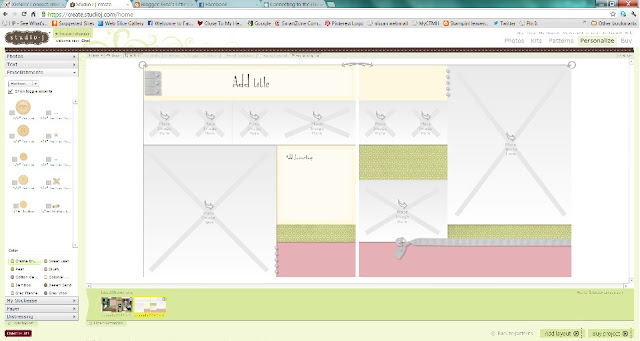
Today I'm going to share another Studio J layout.   This is the 2nd of five FREE layouts that I got to create for attending the Close To My Heart Convention in July.  In this layout, we learned how to delete photo wells, used text boxes to cover up portions of the pattern and cropped stickease borders to make ribbon streamers. For this layout we chose the Lucy paper and selected the Stars Above pattern.   Here is a picture of the layout before I started making changes to it. One of the first things I did before beginning the layout was 'turn off' the toggle accents.  This will delete the accents that are already placed on the layout.  See the 'greyed' ribbon and brads on the right page?  Turning off the toggle accents makes these disappear and I can place my choice of accents anywhere on the page!   (This button is just under the "Embellishments" on the left side) This layout is designed for 9 pictures.  But I only had 3 picture...

Fabulous Four - Studio J

Image
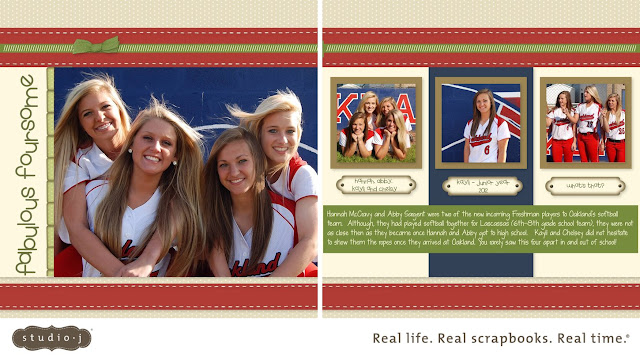
WOW...... I just can't keep up right now!  My poor little blog has been so neglected because I've been so busy!   I did take a break the last two evenings from my Extravaganza Creating to work on some Studio J layouts.   Everyone attending this year's Close To My Heart Convention got a FREE 5-pack to Studio J.   I love Studio J but I love hands on paper crafting too so it's been a little while since I've worked in Studio J.   After convention I had planned to scrapbook my daughter's Junior year softball season in Studio J.  So this really came at a good time! It's a lot more fun to do these layouts in Studio J rather than actual scrapbooking.  I don't know why - I guess because I feel like I'm doing the same layouts year after year.   Not much changes with softball! Along with the FREE 5 pack they sent us instructions for completing the 5 layouts - to teaching new techniques and some really cool things your can do in Studio J!  I'm going to...

Taking a Short Break to Wrap up a Season!

Image
I'm sorry my posts have been sporadic as of late.  We have reached the last few weeks of my daughter's High School Softball season.   Our school is hosting the District Tournament.   Hosting a successful tournament requires a lot of work from all the parents so that means I've been spending many nights at the ball field from beginning to end! Since I'm their Booster Club Treasurer I'm usually the first one there with money for concession and gate.  Then, I stay through the end to collect and total up before leaving. I had one free night last week and I had intended to spend some time catching up on some creative things.  But, I was so exhausted I just couldn't get myself into my scraproom! We had games Friday & Saturday so I knew there were a few things I absolutely HAD to get done today.  Those came first before I would allow myself any 'play' time for challenges that I love to participate in.   But alas, I ran out of time.  ...

Just in Time for the 4th - Taking Fireworks Pictures!

Image
 Did you know Studio J has a blog?  It has some great tips and techniques just in time for July 4th!  I've always tried to take pictures of fireworks but they never seem to turn out.   This article on Studio J tells you all the ins and outs to taking great fireworks shots - SIMPLY!                                     Check out the article HERE at Studioj.com/blog Don't forget!  Today is the last day to get your FREE JPG from Studio J.  Go now and give it a test run.  You will love it!  You have until August 15th to send me your FREE JPG for your chance to win a free 3 month membership to Studio J. (fireworks photo compliments of StudioJ.com)

Playin' in the Studio

Image
Studio J that is!   Have you played yet?  Don't forget - there is about 15 days left to try it out and get your FREE JPG!   I've been so busy with non-scrap related business that I haven't had much of a chance to sit down at my scrap table to create.  I've GOT to get back in there!   But, in the meantime, I have stolen a few minutes to create some pages.  I've created 5 layouts so far for my daughter's softball book.  I just now ordered my FREE JPG for one of the layouts.  Within 5 minutes (or less) I recieved my email with the JPG's attached.   How cool is that!  So I'm sharing it here and I'll also share it on my Facebook page!  (you can click on the layout for a larger view) For my layout I chose to use Fanfare paper.   The layout pattern I chose, did not actually fit the demensions of my pictures so I just rotated them so that I could use a large horizontal team picture ...

Studio J - Love Your Layout June!

Image
I sat down last night to check my email and a few other things and decided I would do a quick Studio J Layout.   Before I knew it, I had finished 2 more layouts of my daughter's sophomore season of softball.   All in less than an hour!  I can't wait to share them with you.    In the meantime, check out June's installment of "Love Your Layout" for Studio J. Kristine shows you how to make a flower out of knotted ribbon and then she tops it off with two brads one on top of the other.  This is something you'll never see with classic scrapbooking!  There are so many cool the things you can do!   Sit back and enjoy this quick little video. Don't forget to try out Studio J for yourself!  Get your FREE JPG and share it with me. I will post it  on my Studio J page here on my blog and then enter your name in a drawing for a FREE 3 - month membership!

Studio J - Love Your Layout!

Image
If you've checked out my June Special page you've seen that this month Close To My Heart is offering a FREE JPG from Studio J.   No purchase necessary!  That is a pretty cool way to get everyone to try out this awesome way to scrapbook.    These pages look so traditional, you'll be able to slip these in among your other pages that you have created with actual paper and embellishments, that no one will notice the difference! Really!! I had some Studio J pages displayed on my wall at my workshop for months and once I mentioned that I did them in Studio J, some of my customers had to walk up to them to feel them! They thought all along they were pages that I created with paper, ribbons, brads and more! With Studio J, there is no program to purchase and download to your computer, no 'extra embellishments' to purchase.   All you have to do it go to my website and click on Studio J to get started!  (You may be asked to set up an account if you do not already ha...

Catching Up with Studio J

Image
I think we all feel a little behind when it comes to scrapbooking.  I know I do!  I FEEL organized.  I THINK I am.   ha ha I will immediately download pictures that I've taken at special events, weekend trips and more. Then I assign them to certain folders with titles and dates.  I know those pictures are there - on my computer when I'm ready to scrap them.  Nothing wrong with that except I'm accumulating more pictures than I have time to scrap!   I have found that I will scrap the more recent events first and those other photos?? Well they just get pushed lower on the priority list.   I'd have to sit down, sort through them and then select the ones I want to print for my layouts.   If I'm sending them to print I feel like I already need to know the layout I'm using so that I will know if I need a 8x10, 5x7 or a regular 4x6.  Oh it's hard to decide! If the picture is particularly good, I'll order at least a 5x7 and ...